The EU right of withdrawal in 2026: the new withdrawal button, and how to comply on any platform
The EU right of withdrawal has not changed, but from 19 June 2026 online stores must add a withdrawal button. What that means, whether it hits UK sellers, the stakes, and how to comply on Shopify, Magento, BigCommerce, PrestaShop and WooCommerce.
If your store sells to EU customers, one missing step in your checkout and returns flow can leave you refunding orders as much as a year later. That is the quiet liability behind the emails landing in merchant inboxes right now. Shopify has been telling merchants about the EU "right of withdrawal" and a deadline of 19 June 2026 [1]. The subject lines make it sound like consumer law is being rewritten and you have days to react. Two things are true at once here: the panic is overblown, and the deadline is real.
Here is the part most of the coverage gets wrong. The right of withdrawal itself is not changing. EU shoppers have had a 14-day, no-questions-asked cooling-off period on online orders for over a decade [4]. What is new is much narrower and much more practical: from 19 June 2026 you have to give those shoppers an actual button to start the cancellation online, in two clicks, without logging in [2]. That is it. A button, a confirmation step, and an email back. Miss it and the downside is not a fine on day one, it is something quieter and more expensive that I will come to.
This piece is the sourced version: what genuinely changed, whether it touches you as a UK seller, what happens if you ignore it, and exactly how to comply on Shopify, Magento, BigCommerce, PrestaShop or WooCommerce, with a developer checklist near the end. It reflects the rules and enforcement landscape as they stand in 2026, and almost every factual claim links to its official source on EUR-Lex and the European Commission [8][13].
What actually changed, and what did not
The cooling-off right lives in the Consumer Rights Directive, 2011/83/EU, which has applied across the EU since 2014 [4]. Under it, a consumer buying online can withdraw from the contract within 14 days of receiving the goods, without giving a reason and without penalty [4]. None of that has moved. The 14 days, the no-reason rule, the refund obligation: all unchanged.
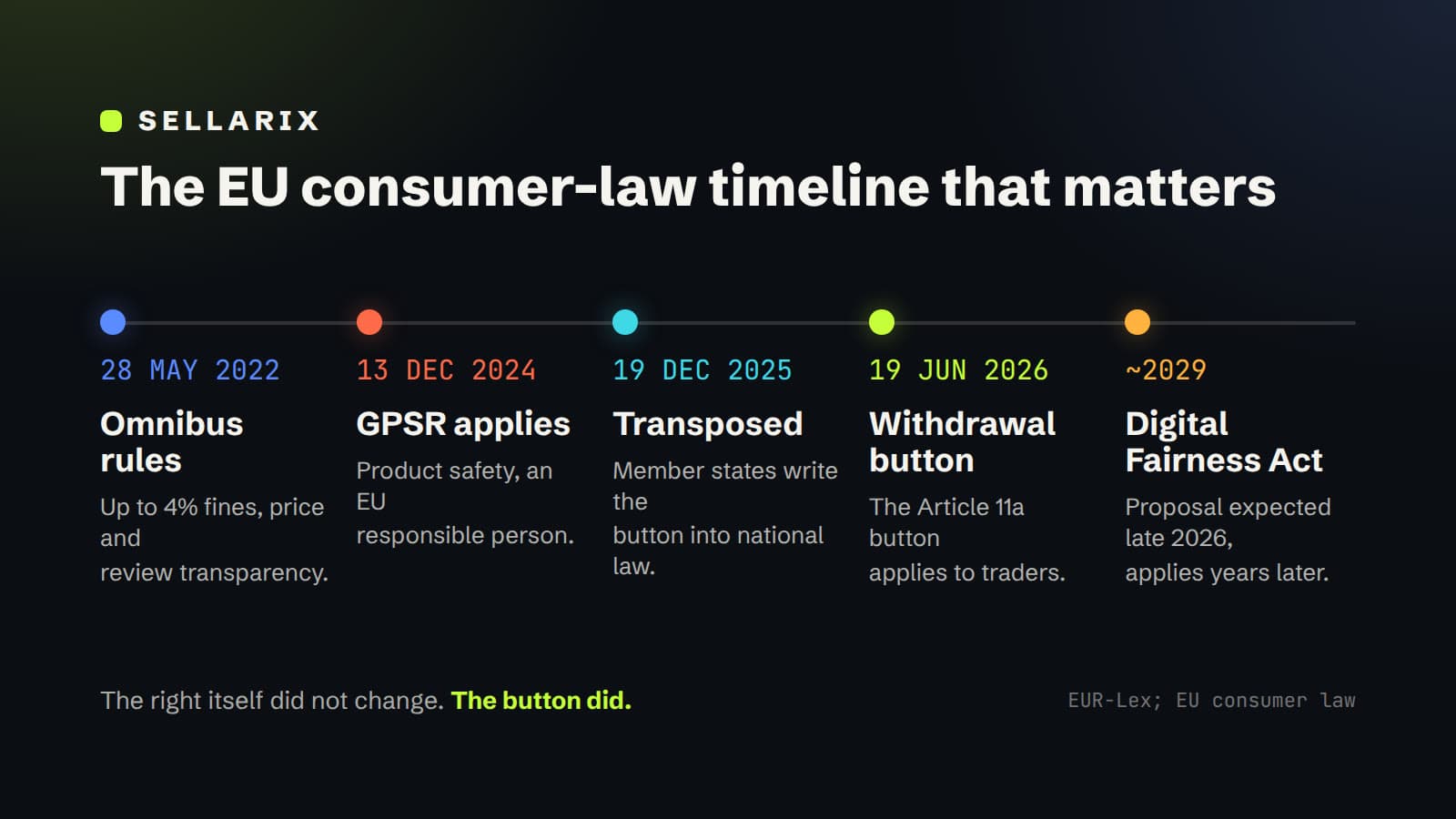
The new bit comes from a separate instrument, Directive (EU) 2023/2673 [2]. It inserts a new Article 11a into the old directive, and Article 11a is the "withdrawal function", what everyone is calling the withdrawal button [2]. Member states had to write it into national law by 19 December 2025, and it applies to traders from 19 June 2026 [6]. So the deadline in the Shopify email is accurate, even if the framing around it is not.
There is a genuinely confusing wrinkle worth clearing up, because it has led some commentators astray. Directive 2023/2673 is titled as being about distance marketing of financial services, and on a quick read you might conclude the button only applies to banks and insurers. It does not. The financial-services rules sit in their own chapter, but Article 11a, the button, was deliberately placed in the general part of the consumer directive, so it covers all distance contracts concluded through an online interface where a withdrawal right exists [2][3]. Ordinary shops selling ordinary goods are in scope. The lawyers writing about it, from Timelex to Hogan Lovells, read it the same way [3][7].
The other thing to get straight is what this is not. You will see a lot of posts tying the withdrawal button to the EU Digital Fairness Act and "one-click cancellation". Be careful with that. The Digital Fairness Act is not law. As of June 2026 it is an announced Commission initiative, with a draft proposal expected around the end of 2026 and realistic application no earlier than about 2029 [15]. It may eventually bring rules on dark patterns, addictive design and hard-to-cancel subscriptions, but none of that binds you today [15]. The dated, real obligation is the 2023/2673 button. If a vendor is selling you a product on the basis that "the Digital Fairness Act requires it now", they are wrong about the law.
| The rule | Where it comes from | Status | The date that matters |
|---|---|---|---|
| 14-day right of withdrawal | Consumer Rights Directive 2011/83/EU | In force since 2014 | Unchanged |
| Online withdrawal button (Article 11a) | Directive (EU) 2023/2673 | In force, applies to traders | 19 June 2026 |
| Up to 4% turnover fines, price and review transparency | Omnibus Directive (EU) 2019/2161 | In force | Since 28 May 2022 |
| Dark patterns, one-click cancellation, addictive design | Digital Fairness Act | Proposal only, not law | Draft expected late 2026, application around 2029 |
| Product safety, EU responsible person | General Product Safety Regulation (EU) 2023/988 | In force, separate regime | Since 13 December 2024 |
One note on that last row. The most-emailed EU compliance topic of the last eighteen months was not the withdrawal button, it was the General Product Safety Regulation, in force since 13 December 2024, which needs things like an EU-based responsible person for the products you sell [16]. Shopify bundles both into its "selling to the EU" messaging, but they are different regimes. This article is about withdrawal; if you ship physical goods into the EU, treat the responsible-person rule as a separate, equally real task [16].
Does this actually impact you?
The instinct for a UK merchant is to assume EU law is someone else's problem after Brexit. That instinct is wrong here, and it is worth understanding why, because the reasoning decides what you have to do.
EU consumer law follows the consumer, not the seller. If you direct your business at consumers in an EU member state, by shipping there, pricing in euros, offering a local language, or accepting EU delivery addresses, the mandatory consumer protections of that shopper's country apply to the sale [8]. This is the targeting principle that sits underneath the Rome I rules on contracts, and it is exactly how Shopify frames its own guidance: the withdrawal rules cover any business selling online to consumers in the EU, wherever the business is based [1]. A UK Ltd shipping a jumper to a customer in Dublin or Munich is squarely in scope.
So a UK seller selling into the EU actually carries two obligations at once. EU customers get the EU right of withdrawal and, from 19 June, the EU withdrawal button [2]. UK customers get the near-identical British version under the Consumer Contracts Regulations 2013 [39]. The two regimes are about 95% the same, which is good news, because it means one well-built cancellation flow can satisfy both with small local variations. I will come back to the UK detail later, but hold onto the headline: if you ship to both, you build for both.
The self-check is three questions: do you sell to consumers, are any of them in the EU, and do you sell anything that can be returned? Three yeses and the 19 June button applies to you, while your platform almost certainly does not provide it out of the box. The rest of this article is about closing that gap.
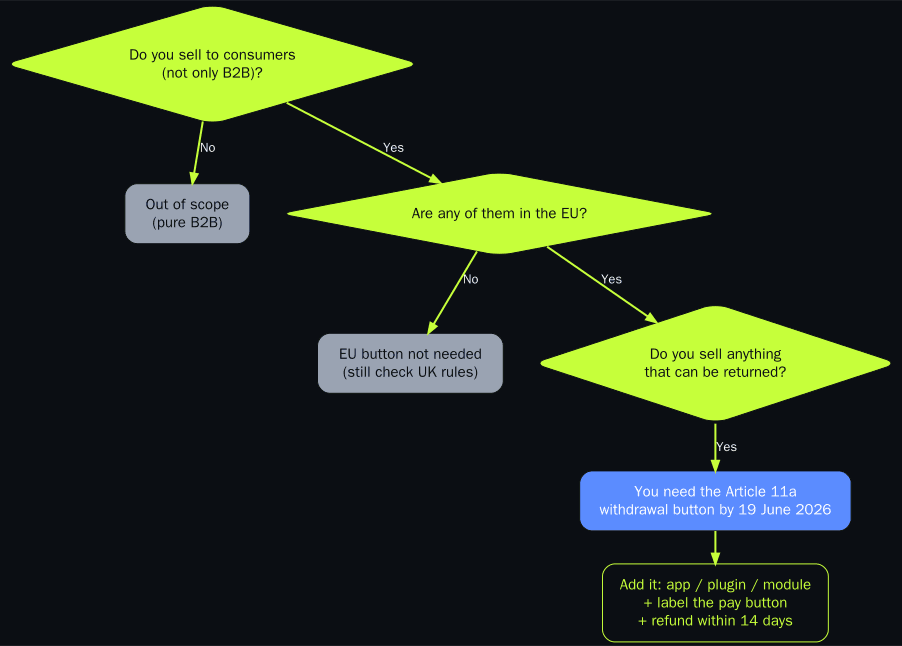
Key takeaway: if you sell to consumers, some of them are in the EU, and you sell anything that can be returned, the 19 June withdrawal button applies to you, wherever your business is based.
The stakes if you do nothing
The reason to act is not a knock on the door from a regulator the morning of 20 June. Enforcement of consumer law is rarely that dramatic. The real exposure is a stack of smaller, compounding risks, and one of them is genuinely nasty.
Start with the nasty one. If you do not properly inform a consumer of their right of withdrawal, the withdrawal period does not just stay at 14 days, it extends by up to 12 months [5]. So a customer who was never told they could cancel can come back as much as a year and 14 days after delivery and still send the item back for a full refund [5]. After 19 June, failing to provide the compliant online withdrawal function is a strong candidate for "did not properly enable or inform", which drags you into that extended-return territory [5][9]. A whole year of open-ended returns on every EU order is a far worse outcome than the cost of adding a button.
Then the fines. The Omnibus Directive, in force since May 2022, lets member states fine widespread consumer-law breaches up to 4% of annual turnover, or up to 2 million euros, roughly 1.7 million pounds, where turnover is unknown [10][11]. Those are ceilings for serious cross-border breaches, not a tariff for a missing button, but they show the size of the stick [11].
There is also a quieter contractual trap that predates all of this and still catches people. The button on which a customer places an order has to be labelled so that it is obvious they are agreeing to pay, with wording like "order with obligation to pay" [3][12]. If it is not, the consumer is simply not bound by the contract [3]. The EU's top court confirmed in the Fuhrmann-2 case that only the words on the button itself count, surrounding text does not rescue a vague label [19][20]. A checkout that ends on "Complete" or "Confirm" rather than something that signals payment is a contract you cannot enforce [19].
| What goes wrong | Why it bites | Legal basis |
|---|---|---|
| Returns window blows out to 12 months plus 14 days | You did not properly inform or enable the withdrawal right | CRD Article 10 |
| Fines up to 4% of turnover, or up to 2m euros | Widespread or cross-border consumer-law breach | Omnibus Directive 2019/2161 |
| The order is not legally binding | Pay button not clearly labelled as an obligation to pay | CRD Article 8(2), Fuhrmann-2 |
| Chargebacks and disputes rise | Customers route around a missing cancel option via their bank | Operational, follows from the above |
| Listings suspended on marketplaces | Platforms enforce EU consumer and safety law as a listing condition | Platform policy |
None of these is hypothetical, and they stack. The cheap insurance against all of them is to do the small amount of work the directive actually asks for.
Key takeaway: the worst case is not a fine on day one, it is a returns window that legally stretches to a year because you never told customers how to cancel. The button is cheap insurance against that.

What we found: most stores are not ready
Plenty of guides explain this rule. We wanted to know whether anyone has actually built it yet, so we went and looked.
On 13 June 2026, days before the deadline, Sellarix audited 30 real EU-facing online stores, a mix of UK and EU brands across Shopify, Magento and custom platforms. For each one we looked, as a logged-out shopper would, for a dedicated, clearly labelled way to start a withdrawal from the public storefront, the kind of function Article 11a now requires. We also noted whether the store mentioned the 14-day right of withdrawal anywhere in its policies [2].
Only 6 of the 30, that is 20%, had a dedicated, storefront-accessible withdrawal function. The other 80% did not. Where withdrawal was possible at all, it meant emailing support, using a returns-only portal, or hunting through a policy page. And 43% did not mention the 14-day right of withdrawal anywhere we could find.
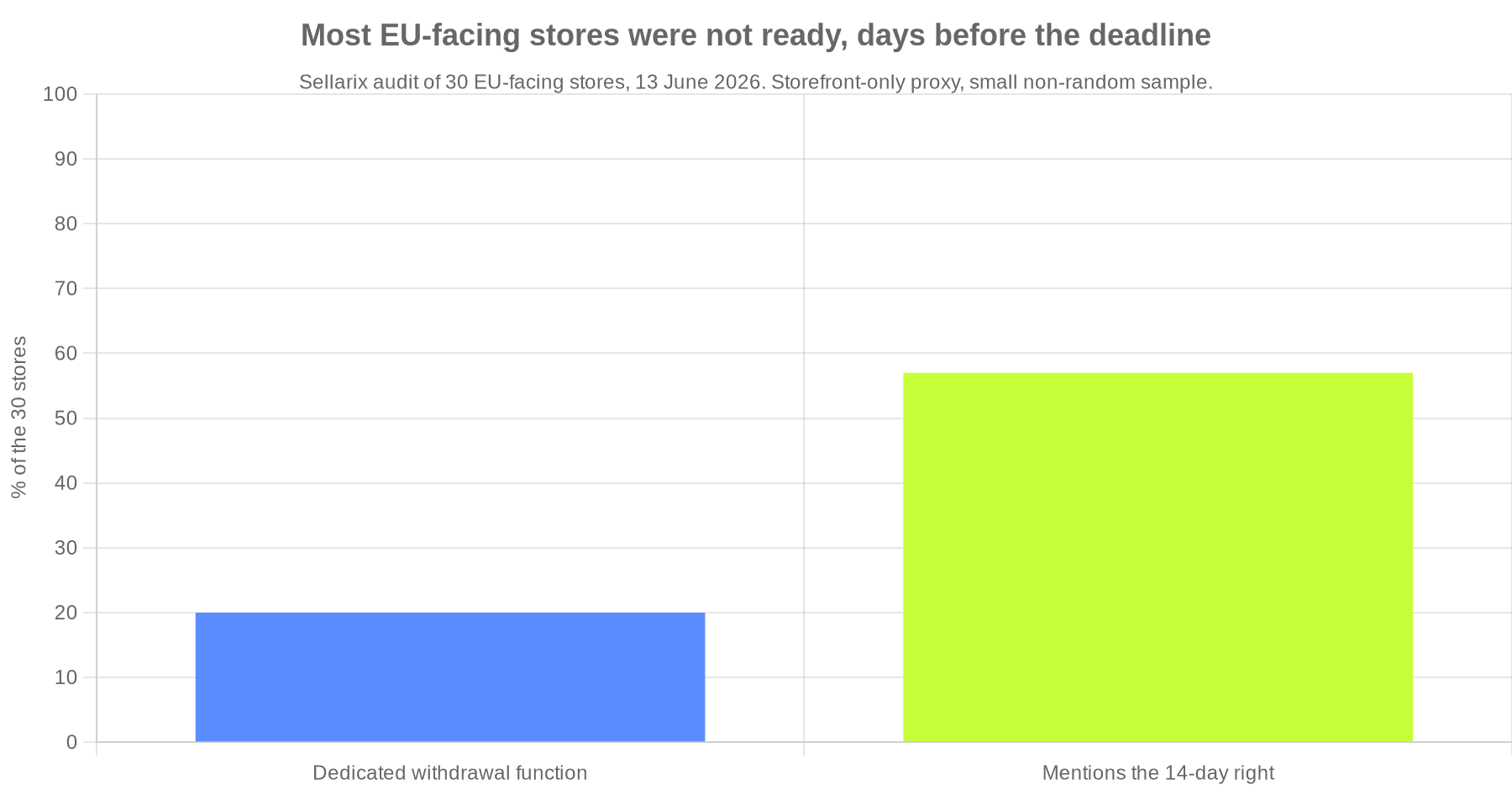
The split by origin was telling. Among the UK stores we checked, just 1 of 15 had a withdrawal function. Among EU-based stores it was 5 of 15, which fits, since German and other EU sellers have operated under an established right-of-withdrawal regime for years. The handful that got it right, and are worth copying, included the German retailers Thomann and Lampenwelt, whose footers carry a plain "cancel the contract" link that opens an interactive form, alongside Kapten and Son, SNOCKS, Denmark's Organic Basics, and the UK's own Passenger Clothing, which already has a "Cancel Contract" form in its footer.
Treat the number as a snapshot, not gospel. It is a small, non-random sample of 30, checked from the public storefront only, before the deadline, so some of these stores may keep a mechanism inside a logged-in account, or may add one before 19 June. But the direction is hard to miss: with days to go, the large majority of stores selling into the EU had nothing a shopper could find, which is exactly the gap the rest of this article is about closing [7].
What the withdrawal button actually has to do
Strip away the legalese and Article 11a asks for three things [2].
First, a withdrawal function that is clearly labelled, easy to find, and continuously available throughout the 14-day window. Shopify's own reading, which matches the directive, is that it has to be reachable without the customer logging in [1][2]. So an option buried inside a password-protected account area is not enough on its own. Think of it as a permanent, obvious link, in the footer, the order confirmation email, and the order-status page, that says something like "withdraw from contract here" [2].
Second, a two-step confirmation. The customer clicks the withdrawal function, then confirms on a second screen, submitting the details that identify their order, and finishes on a function labelled to the effect of "confirm withdrawal" [2]. The two-step design is deliberate: it stops accidental cancellations while keeping the route genuinely open.
Third, an acknowledgement on a durable medium, sent without undue delay, recording the content of the withdrawal and the date and time it was submitted [2]. In practice that means an automatic email back to the customer, and you should keep your own timestamped copy, because that record is your evidence the request was handled.
Worth saying clearly: this does not create a new right or replace the model withdrawal form a customer can already use [3]. It is an additional, always-on way to exercise the existing right, and you still owe the refund within 14 days, by the original method [4]. The button is the front door, not the whole house.
If you are on Shopify
Shopify has been the loudest about this, so start there. The Shopify Help Centre has a dedicated page on EU right-of-withdrawal compliance that states the directive, the 19 June 2026 date, the login-free labelled function, the two-step confirmation and the durable-medium email [1]. It is accurate and worth reading. What it does not do is give you the button. As of mid-2026 there is no native Shopify withdrawal function, and the page itself does not ship one or point to a specific tool [1]. The button itself comes from an app. The Shopify App Store has several purpose-built for Directive 2023/2673, such as Revoq's EU withdrawal button and a handful of similar tools, which add the two-step flow, match the order, send the confirmation email and place a storefront button that does not require login [28]. Pick one, install it before 19 June, and put its block in your footer and order-status page. Re-check the specific app and its reviews at install time, because this corner of the App Store is new and moving quickly [28].
The pay-button wording is yours to fix, on any plan. Shopify's checkout is largely locked, but the final button text is a language string, not checkout code, so you can edit it under your store's languages to read "order with obligation to pay" or a clear equivalent, per EU language [23]. You do not need Shopify Plus for that. You do need Plus and checkout extensibility if you want to change the checkout layout or add fields inside it, which most merchants will not need for this [24].
Your policies need the actual withdrawal wording. Shopify generates policy templates under Settings then Policies and auto-links them in the footer and at checkout, but the templates are a starting point, not a compliance guarantee, and Shopify says so plainly [22]. Add the right-of-withdrawal terms, the 14-day cooling-off period and the model withdrawal form to your refund or returns policy yourself [21][22].
Returns and the refund clock are only partly handled. Shopify's self-serve returns and return rules let you set a return window and let customers start a return, but Shopify times the return window, not your refund deadline, so reimbursing within 14 days of a valid withdrawal is a process you run, not a setting [4][25][26]. Selling across several EU countries, use Markets with Translate and Adapt to localise the policy text and button label per language [27].
Not on Shopify? How to protect yourself on the other platforms
This is the question the Shopify emails never answer, because Shopify has no reason to. The directive does not care what you run on. If you are on Magento, BigCommerce, PrestaShop or WooCommerce, the same three requirements apply, and each platform meets them differently. Here is the practical state of each.
WooCommerce is, a little surprisingly, the easiest place to land the new button. WooCommerce's own guidance confirms core does not provide a withdrawal function and tells you to add a footer link to a form that takes a name and order reference and sends a confirmation [31]. You do not have to build that from scratch. The Germanized for WooCommerce plugin, free tier included, has shipped a withdrawal button feature you configure in settings, with a confirmation email and a dedicated order status [32][33], and WebToffee publishes a free plugin built specifically for Directive 2023/2673 [34]. Install whichever you prefer the usual way:
# Germanized (free): the withdrawal button lives under
# WooCommerce > Settings > Germanized > General > Withdrawal Button
wp plugin install woocommerce-germanized --activate

# or the purpose-built WebToffee plugin for Directive 2023/2673
wp plugin install eu-withdrawal-button-for-woocommerce --activate
The pay-button label is a one-line change even without a plugin:
add_filter( 'woocommerce_order_button_text', function () {
    return 'Order with obligation to pay';
} );
Drop that in your child theme's functions.php and the checkout button text changes everywhere [31]. Between core, a one-line filter, and a free plugin for the button, WooCommerce is low effort.
PrestaShop has the strongest baseline of any of these. It ships a free, bundled module called Legal Compliance, ps_legalcompliance, written specifically for EU law [29][30]. Enable it and switch on the revocation terms:
# enable the bundled EU legal module (or use Modules > Module Manager in admin)
php bin/console prestashop:module install ps_legalcompliance
# then Admin > Modules > Legal Compliance > Configure:
#   Include Revocation Terms within the Terms of Service  -> Yes
#   Virtual-product withdrawal-waiver checkbox            -> Yes
That module manages your legal pages by role, attaches the revocation terms to order emails as a durable record, and adds the mandatory checkbox that confirms a customer loses the withdrawal right once a download begins [29][30]. The 14-day right, the model form text and refunds are then largely handled in admin [29].
Two things still need a developer or an add-on. The literal pay-button wording lives in the theme template, not an admin toggle, so override it in a child theme (the exact partial varies by theme and version, so confirm yours):
{* themes/<your-theme>/templates/checkout/_partials/order-confirmation.tpl *}
<button type="submit" id="payment-confirmation" class="btn btn-primary">
  {l s='Order with obligation to pay'}
</button>
And the new 19 June button is not in the bundled module, so add a purpose-built one. Worth comparing:
- sjmedia EU-compliant withdrawal button is a dedicated two-step 2023/2673 button with an automatic order status and a durable-medium email, around £60.
- MedRetractation by Mediacom87 puts a withdrawal button in the customer account and an optional footer link, with the model form and ready-made T&C texts, around £50.
- PS Mandatory Withdrawal Button (PS IT Solution) records the request and emails confirmation, and is built explicitly for Directive 2023/2673, around £35.
ps_legalcompliance(free, bundled) is the legal-pages baseline above, not the button, so pair it with one of these.- widerrufsbutton.online is a free hosted withdrawal link you drop in the footer, shop-agnostic so it works on PrestaShop too.
Magento, now Adobe Commerce, gives you total control and therefore the most work, but the two changes you need are well-trodden. Legal pages are CMS pages, the terms-and-conditions checkbox is native (Stores > Configuration > Sales > Checkout > Checkout Options > Enable Terms and Conditions), and refunds run through credit memos [35]. The new work is the button label and the withdrawal function.
Relabel the order button with a translation override rather than editing core. Add one row to your theme's locale CSV, per language:
# app/design/frontend/<Vendor>/<theme>/i18n/en_US.csv  (also de_DE.csv, fr_FR.csv, ...)
"Place Order","Order with obligation to pay"
The withdrawal function has no dominant ready-made extension, so it is usually a small custom module: a front-end route, a controller that shows the two-step form, and an action that emails the acknowledgement. The shape of it:
<!-- app/code/Vendor/Withdrawal/etc/frontend/routes.xml -->
<config xmlns:xsi="http://www.w3.org/2001/XMLSchema-instance"
        xsi:noNamespaceSchemaLocation="urn:magento:framework:App/etc/routes.xsd">
  <router id="standard">
    <route id="withdrawal" frontName="withdrawal">
      <module name="Vendor_Withdrawal"/>
    </route>
  </router>
</config>
// app/code/Vendor/Withdrawal/Controller/Confirm/Index.php
class Index implements \Magento\Framework\App\Action\HttpPostActionInterface
{
    // inject TransportBuilder + OrderRepository in the constructor
    public function execute()
    {
        // 1. match the order from the order reference + email
        // 2. record the withdrawal with a timestamp
        // 3. email the customer an acknowledgement on a durable medium
        // 4. render a "confirm withdrawal" success page
    }
}
One caution before you shop: Adobe Commerce's native GDPR features are about data protection, not the right of withdrawal, so do not lean on them here [35]. Dedicated button modules do skew German, and there is a reason: the requirement grew out of German law (the so-called button solution and the BGB) and Germany's aggressive warning-letter enforcement, so German agencies productised it first. The two best picks are not locked to that, because both are free and work anywhere:
- MageMe EU Withdrawal Module is the cleanest non-German option: a free, dedicated 2023/2673 button with a guided storefront flow, a durable-medium receipt and the Annex I form content in 22 locales, Hyvä-compatible.
- Zwernemann Withdrawal Button is free and open source (a German author, but MIT-licensed, so nationality is moot): the two-step button, model form, guest lookup, durable-medium emails and all 24 EU languages.
If you want a paid, supported product, the established options are KonVis Widerrufsbutton (around £60) and Simple Web-Solutions Widerrufsbutton (price on request).
For the adjacent duties the international ecosystem is wide. None of these give you the button itself, so pair them with one above: GDPR and cookie-consent suites from Amasty (Cyprus), Mageplaza (Vietnam, free tier), Mirasvit (Ukraine) and Aheadworks (US); and if you would rather build the form yourself, form builders such as MageMe WebForms or Mageplaza Custom Form.
BigCommerce is the trap, and for exactly the reason people leave Shopify hoping to escape it: the checkout is a hosted application you cannot freely edit [36][37]. You can change policy pages, the terms checkbox, refunds and the order-confirmation email easily enough [37]. What you cannot easily do is change the button wording inside checkout or inject a withdrawal function into it, without building a custom checkout on the Open Checkout codebase or the Checkout SDK, which is a serious piece of work [36]. So do not fight the checkout. Put the withdrawal function where the directive actually needs it, in the storefront [36].
Create the two-step withdrawal form as a Web Page (Storefront > Web Pages), reusing the model form in the developer checklist below, then link to it from your footer in the Stencil theme:
{{!-- templates/components/common/footer.html --}}
<a href="/withdraw-from-contract" class="footer-link">
  Withdraw from contract here
</a>
Add the same link to your Order Confirmation email under Marketing > Transactional Emails so the route also sits on a durable medium [37]. Verify the in-checkout button label per locale, because that is the one thing you have limited control over without a custom checkout [37].
Be honest with yourself on the options here, because dedicated withdrawal-button apps barely exist on BigCommerce. It is one turnkey service, plus native plumbing and the adjacent tools:
- UndoPortal is effectively the only turnkey withdrawal-button service for BigCommerce, with a free, login-free, two-step compliant form and a durable-medium email.
- Open Checkout,
checkout-jsis the open-source checkout codebase to fork if you must change the button wording or add a checkbox inside checkout (free, but developer-heavy). - Page Builder and Web Pages is the native way to host the withdrawal form and the cancellation and legal pages on your storefront (free, built in).
- iubenda or Termly cover the adjacent GDPR and cookie-consent duties, added through Script Manager (free tiers).
- ReturnGO handles the physical return after a withdrawal, which is returns and RMA logistics rather than the legal button itself.
| Platform | Baseline legal pages and terms | Pay-button label | The new 19 June withdrawal button | Effort |
|---|---|---|---|---|
| WooCommerce | Core terms page, refunds; Germanized fills the rest | Plugin setting or a one-line filter | Free plugin, Germanized or WebToffee | Low |
| PrestaShop | Free bundled Legal Compliance module, strong | Theme template edit | Paid marketplace add-on | Low to medium |
| Magento, Adobe Commerce | CMS pages, native terms checkbox, credit memos | Translation or template override, developer | Custom module or German-market extension | High |
| BigCommerce | Web pages, terms checkbox, refunds, easy | Limited, locale-dependent in hosted checkout | Add as a page and form outside checkout | Medium, hard inside checkout |
| Shopify | Policy templates, self-serve returns | Editable language string, any plan | App, no native function | Low to medium |
The pattern is clear. Open-source platforms, WooCommerce and PrestaShop, give you the most for free. The hosted checkouts, BigCommerce and Shopify, make anything inside the checkout itself awkward, which is why on both the smart move is to keep the withdrawal function in the storefront, not the checkout.

The developer checklist: what to tell whoever builds your store
This is the section to forward. It is platform-agnostic, it maps each item to the law so nobody argues about it, and it is the difference between "we added a button" and "we are actually compliant". The cooling-off right comes wrapped in a set of duties that all need to be live together [4].
- Show the pre-contract information before the customer is bound. The directive lists what has to be visible before purchase, including the main characteristics, the full price including taxes and delivery, your identity and contact details, and the conditions and procedure for withdrawal with the model form [4]. Put it on the product page and a clearly linked terms or returns page, not buried after checkout. Model it as one source of truth and localise it per market.
- Label the pay button as an obligation to pay. "Order with obligation to pay", "Buy now" or an unambiguous equivalent, and never "Confirm", "Continue" or "Register" [3]. Get this wrong and the order is not binding [19].
- Provide the withdrawal function and the model form. The always-on, login-free, two-step button from Article 11a, plus the classic model withdrawal form made available as a download and reproduced in the order confirmation [2][4]. The button is additional to the form, not a replacement [3].
- Confirm the contract on a durable medium. An email or PDF, sent at the latest by the time the goods are delivered, that includes the withdrawal information and the model form [4].
- Refund within 14 days, by the original payment method. Reimburse all payments, including standard outbound delivery, within 14 days of being told of the withdrawal, using the same means of payment [4]. You may hold the refund until the goods come back or the customer proves they posted them [4].
- Build the exceptions in as a per-product flag. Some items carry no withdrawal right: made-to-measure or personalised goods, perishables, sealed health or hygiene goods once unsealed, sealed audio, video or software once opened, and dated services like hotels or events [4]. Drive these from a product attribute, not ad-hoc rules.
- Handle digital content consent properly. For downloads or streaming that start inside the 14-day window, capture two separate, un-pre-ticked confirmations: express consent to begin now, and acknowledgement that doing so ends the withdrawal right [4]. Store an auditable record. Miss any element and the right survives.
- Keep the cancel flow as easy as the buy flow. No pre-ticked boxes, no confirm-shaming, no obstruction. The Omnibus rules already catch manipulative checkout and cancellation design, and the future Digital Fairness Act is expected to go further, so build the friction-free version now [13][15].
Here is the shape of the model withdrawal form the directive expects you to make available, reproduced from Annex I of the directive [4]:
To [trader's name, geographical address and, where available, fax number and email address]:
I/We hereby give notice that I/We withdraw from my/our contract of sale of the following goods / for the provision of the following service,
Ordered on / received on,
Name of consumer(s), Address of consumer(s), Signature of consumer(s) (only if this form is notified on paper), Date
And the minimum shape of the online withdrawal function itself, the new requirement, is a small two-step form. Step one collects what is needed to find the order, step two confirms:
<!-- Step 1: always reachable, no login required -->
<form action="/withdrawal/start" method="post">
  <h2>Withdraw from your contract</h2>
  <label>Order number <input name="order_ref" required></label>
  <label>Email used for the order <input type="email" name="email" required></label>
  <label>Items you are withdrawing from <textarea name="items"></textarea></label>
  <button type="submit">Withdraw from contract here</button>
</form>

<!-- Step 2: confirmation screen -->
<form action="/withdrawal/confirm" method="post">
  <p>Please confirm you want to withdraw from order #<span>{{ order_ref }}</span>.</p>
  <input type="hidden" name="token" value="{{ csrf_token }}">
  <button type="submit">Confirm withdrawal</button>
</form>
On submission, send the customer a timestamped acknowledgement by email and store a copy. That, plus the labelled pay button and the policy text, is the whole job [2].
The UK angle: you are building for two regimes
If you sell to UK customers as well as EU ones, the British rules apply to those UK sales, and they mirror the EU ones closely enough that one flow can serve both with small tweaks.
The Consumer Contracts (Information, Cancellation and Additional Charges) Regulations 2013 are the UK transposition of the original EU directive and survived Brexit intact [39]. They give UK consumers the same 14-day cancellation right, require the same kind of pre-contract information, and carry the same pay-button rule: regulation 14 says that where ordering involves a button, it must be labelled "order with obligation to pay" or an unambiguous equivalent, and if it is not, the consumer is not bound [39]. The refund rules match too, within 14 days, by the original method [39]. And the UK has the same sting in the tail as the EU: fail to tell the customer about the cancellation right and the window extends, up to a maximum of 12 months [41]. The model cancellation form is in Schedule 3 of the regulations and reads almost identically to the EU one, just with "cancel" in place of "withdraw" [40].
The one real divergence is enforcement, and it now has teeth. The Digital Markets, Competition and Consumers Act 2024 changed how UK consumer law is policed [42]. Since 6 April 2025 the Competition and Markets Authority can decide a business has broken consumer law and impose penalties directly, without going to court [43]. The penalty ceilings are serious, up to 10% of global annual turnover for substantive breaches [42]. The same Act also banned fake reviews outright and clamped down on drip pricing, where mandatory fees are hidden until late in checkout, both of which are worth a separate look [45]. One thing the UK has not yet switched on is its new subscription-contracts regime, the easy-exit and reminder rules, which has slipped to around spring 2027, so do not build to those dates yet [44].
The practical upshot is simple. The UK has no withdrawal-button mandate of its own, so the button is an EU-facing job [39]. But the cancellation right, the pay-button label, the refund timing and the model form are obligations on both sides of the Channel. Build the cancellation flow once, to the stricter of the two standards wherever they differ, then vary the language, the form title, EU "withdrawal" versus UK "cancellation", and the always-on button for EU customers. One flow, two regimes, no duplication.

AI checkout and the right of withdrawal
Here is the angle nobody emailing you about 19 June is thinking about, and it is the one that will matter most over the next few years. Shopping is moving inside AI assistants and agentic checkout, where a bot finds the product, builds the basket and pays on the shopper's behalf, sometimes without the customer ever seeing your storefront. We covered that shift in our piece on agentic checkout arriving in the UK, alongside the wider question of what AI in ecommerce is actually worth adopting. It runs straight into the right of withdrawal in three concrete ways.
The first is the order button. The consumer is only bound if the pay button is clearly labelled as an obligation to pay [3]. When an AI agent clicks through a delegated, tokenised checkout, who actually read that label? You are still the merchant of record, so the duty to inform is still yours, which means the pre-contract information and the withdrawal terms have to travel with the agent transaction, not sit on a product page the shopper never opened [4].
The second is reachability. Your withdrawal function has to be easy to find and always available [2]. A customer who bought through an assistant may never return to your site to hunt for a footer link, so the withdrawal route belongs in the durable-medium confirmation email and the order-status page, the two places an agent-led buyer can still reach, rather than relying on storefront navigation alone [2].
The third is automation cutting both ways. The same assistants will soon file withdrawals on shoppers' behalf, so your two-step function should accept a clean, unambiguous submission rather than assuming a human is clicking through it. Build it to be machine-readable and honest now, and you are also ahead of the Digital Fairness Act, which is expected to target manipulative and AI-driven design when it eventually arrives [15].
What to do this week
The deadline is not on the horizon, it is here. With 19 June days away, work down this list in order:
- Confirm you are in scope. If you sell to consumers, some are in the EU, and your products can be returned, the answer is yes.
- Add the withdrawal function. An app on Shopify or BigCommerce, a free plugin or one-line filter on WooCommerce, the bundled module plus an add-on on PrestaShop, a module on Magento. Make it reachable without login, from the footer, the order confirmation email and the order-status page.
- Fix the pay button. Make it read as an obligation to pay in every language you sell in.
- Update your withdrawal policy. Put the right-of-withdrawal terms, the 14-day cooling-off period and the model form into your returns policy, instead of trusting a template.
- Handle digital-goods consent. Capture the two separate, un-pre-ticked confirmations before any download or stream starts inside the window.
- Automate the refund. Make sure a real process refunds valid withdrawals within 14 days, by the original payment method.
- Sort the separate GPSR job. If you ship physical goods into the EU and have not handled the product-safety responsible-person rule, add it to the list [16].
- Diarise a yearly review. Consumer law keeps moving, with the Digital Fairness Act and the UK subscriptions regime both on the way, so revisit cross-border compliance once a year.
That is a few hours of work for most stores, and a developer ticket rather than a project for the rest. Set against a returns window that can legally stretch to a year, it is the cheapest compliance you will buy this year.
The takeaway
The headline doing the rounds, that the EU is overhauling the right of withdrawal, is not really true. The right is the same as it has been since 2014. What is true is smaller and more actionable: from 19 June you owe EU shoppers a clear, always-on, two-step way to start a cancellation online, plus an email confirming it [2]. Shopify will tell you that and leave you to build it. Every other platform expects the same thing and gives you different tools to get there. None of it is hard. The expensive mistake is reading the email, feeling the panic, and then doing nothing because the law sounded bigger than the fix. The fix is a button. Go and add it.
Sources
- Shopify Help Centre, EU right of withdrawal compliance for merchants selling to EU customers
- Directive (EU) 2023/2673, full text including the new Article 11a withdrawal function
- Timelex, The withdrawal button is coming: what is really changing?
- Consumer Rights Directive 2011/83/EU, full text
- Consumer Rights Directive, Article 10, extension of the withdrawal period
- Directive (EU) 2023/2673, official record with transposition and application dates
- Hogan Lovells, EU consumer protection law update: the new mandatory withdrawal button
- EUR-Lex summary, consumer information, right of withdrawal and other consumer rights
- Greenberg Traurig, EU consumer law: new withdrawal button requirements for online contracts
- Omnibus Directive (EU) 2019/2161, official record
- Lexology, the Enforcement and Modernisation (Omnibus) Directive and its penalties
- Consumer Rights Directive, Article 8, formal requirements and the order button
- European Commission, Unfair Commercial Practices Directive
- European Parliament Legislative Train, Digital Fairness Act, status and timeline
- Shopify Help Centre, understanding the General Product Safety Regulation (GPSR)
- Inside Privacy, Covington, CJEU clarifies online order buttons must indicate an obligation to pay (Fuhrmann-2)
- decoded.legal, check your final order button text is compliant or risk a voidable contract
- Shopify Help Centre, consumer protection laws
- Shopify Help Centre, add policies to your store
- Shopify Help Centre, display important information on the checkout page for Germany
- Shopify Help Centre, checkout customization and extensibility
- Shopify Help Centre, setting up return rules and return policy
- Shopify Help Centre, setting up self-serve returns
- Shopify Help Centre, localization and translation
- Shopify App Store, Revoq EU withdrawal button
- PrestaShop documentation, complying with the European legislation
- PrestaShop, ps_legalcompliance module source
- WooCommerce, selling to EU customers: the new withdrawal link requirement
- Germanized for WooCommerce, plugin listing
- Vendidero, implementing a legally compliant EU order withdrawal button in WooCommerce
- EU Withdrawal Button for WooCommerce, WebToffee plugin listing
- Adobe Commerce documentation, GDPR and compliance features
- BigCommerce Developer Center, Open Checkout quick start
- BigCommerce Developer Center, cart and checkout customizability
- Consumer Contracts (Information, Cancellation and Additional Charges) Regulations 2013
- Consumer Contracts Regulations 2013, Schedule 3, model cancellation form
- Business Companion, UK Trading Standards guidance on distance sales
- Digital Markets, Competition and Consumers Act 2024
- Baker Botts, new CMA consumer protection powers in force from 6 April 2025
- Taylor Wessing, UK subscription contracts regime delayed to spring 2027
- CMA, unfair commercial practices guidance, fake reviews and drip pricing