How Many Apps Is Too Many? The Hidden Cost of an Over-Stacked Store
Open your Shopify admin and count your apps. Go on, I'll wait. If the number made you wince a little, this one's for you. I keep meeting operators...
The Sellarix team · 22 May 2026 · 6 min read
Open your Shopify admin and count your apps. Go on, I'll wait. If the number made you wince a little, this one's for you. I keep meeting operators who can name every product in their catalog but have no idea what twelve of their thirty installed apps actually do anymore. They got added for a campaign, a season, a "let's just try it," and then nobody turned them off. Each one is quietly billing you, loading scripts on every page, and widening your security surface. App sprawl is the clutter you can't see because it lives in a settings panel you never open. I'm not anti-app. A good app stack is leverage. But there's a point where adding apps stops compounding your growth and starts taxing it, and most stores blow past that line without noticing. Let me show you where the real costs hide.
The story your speed report is trying to tell you
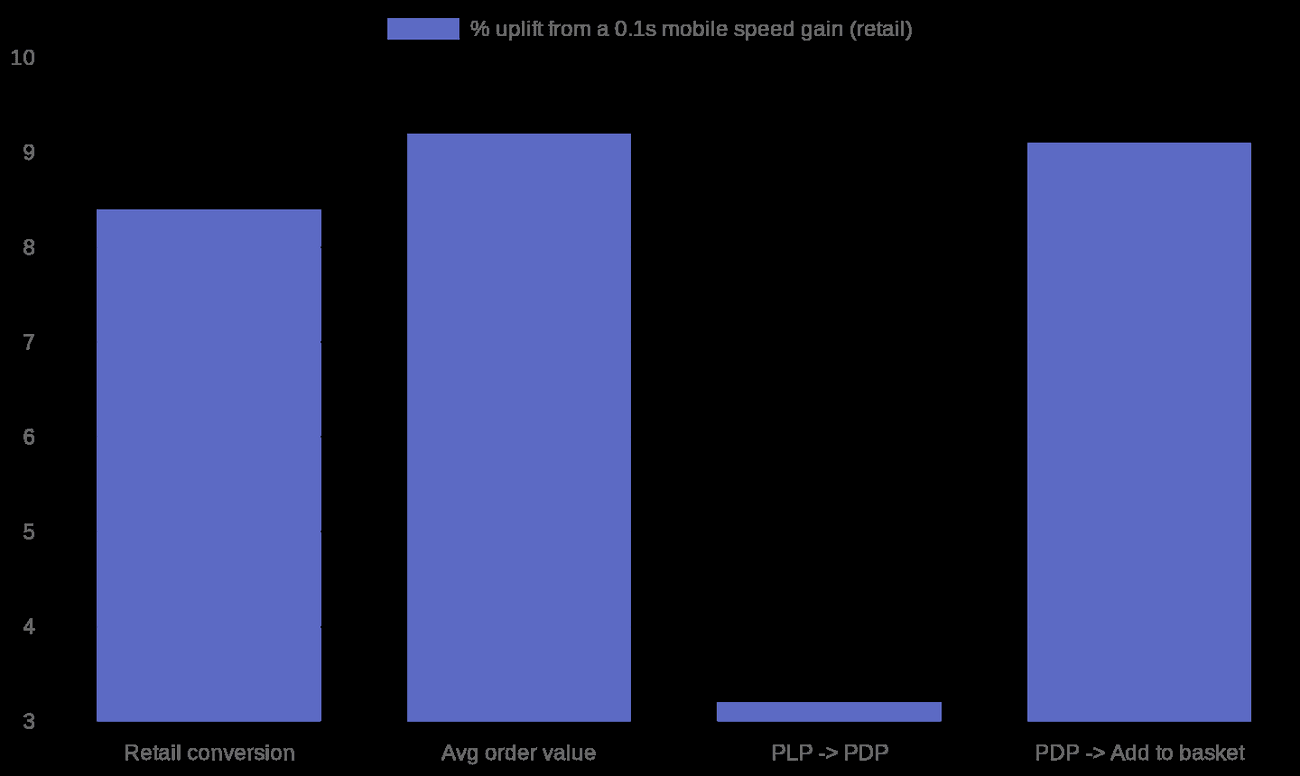
Here's the mechanism. Most apps don't just add a feature, they inject JavaScript into your storefront. A reviews widget, a chat bubble, an upsell popup, an analytics pixel, an A/B testing tool, all of them load third-party scripts, and a lot of them load synchronously in the page head, blocking the browser from painting your page. Audits of Shopify storefronts consistently find that third-party scripts cause the majority of slowdowns, and that a single sloppy app can knock 15–20 points off a Lighthouse performance score. Stack ten to twenty-five render-blocking scripts and you're looking at 1–3 seconds of added load time, most of it landing hardest on mobile where CPUs are weaker. Now connect that to money. The Deloitte / 55 study commissioned by Google, "Milliseconds Make Millions," tracked over 30 million sessions across 37 brand sites and found that a mere 0.1-second improvement in mobile load time lifted retail conversions by 8.4% and average order value by 9.2%. Not seconds. A tenth of a second. Shopify's own data points the same way: roughly every 100ms slower correlates with about 3.5% lower conversion, and stores with a 2.5s largest-contentful-paint convert around 30% worse than stores at 1.5s. Your bloated app stack isn't a tech problem, it's a revenue leak.
The bill you forgot you signed
Speed is only half of it. The other half is the monthly creep. The average paid Shopify app runs about $58/mo, and that climbs north of $100/mo on higher tiers. Sounds harmless one at a time. But the average merchant installs around six apps, and plenty run twenty or thirty. A pretty normal mid-stage store running email, reviews, a loyalty program, subscriptions and advanced shipping is often paying $150–$400/mo in apps alone, on top of the platform plan. That's $1,800–$4,800 a year, and it almost never gets re-evaluated. Worse, a chunk of apps now bill on usage or revenue-share, so your "app tax" scales up exactly as you grow, right when you can least afford the distraction of auditing it.

The audit: how to find what to cut
| Approach | How it works | Cost | Who it fits | Strengths | Gaps |
|---|---|---|---|---|---|
| Manual admin audit | List every app, its monthly cost, last-used date and purpose | Free, \~1–2 hours | Every store, do this first | Surfaces zombie apps and forgotten bills fast | Won't show script weight or speed impact directly |
| Lighthouse / speed report | Run Lighthouse + Shopify's online store speed report; check "reduce third-party code" | Free | Anyone chasing conversion | Quantifies each app's ms cost and render-blocking | Needs a little technical reading |
| Third-party app monitors | Tools that flag heavy/abandoned scripts (e.g. DebugBear-style monitoring) | \~\$20–\$100+/mo | Larger stores with traffic to protect | Ongoing alerts, regression catching | Yes, it's another subscription |
| Consolidate to fewer tools | Replace 3–4 single-purpose apps with one platform that covers them | Varies; often net savings | Stores with overlapping app functions | Fewer scripts, fewer bills, one data model | Migration effort; risk of one-vendor lock-in |
How I'd actually evaluate the stack
Start embarrassingly simple. Make a list of every app, what it costs, and the last time it did something useful. I promise you'll find at least two you forgot you were paying for. Kill those today, that's free money. Next, run Lighthouse and Shopify's built-in speed report (Analytics → Reports → Online store speed) and look specifically at the "reduce the impact of third-party code" line. It tells you, in milliseconds, which app is hurting you most. Sort by that, not by how much you like the feature. Then apply one rule I use on every store: an app earns its place only if its measurable contribution beats its combined cost in dollars and milliseconds. A $20/mo upsell app that adds 0.4s to your product pages is almost certainly losing you more in conversion than it makes in AOV, given what the speed studies show. Be ruthless. The goal isn't the fewest apps, it's the fewest apps that each clearly pay for themselves. The last move is consolidation, and this is where I'll be honest about my own bias since I work on it. When four apps each maintain their own copy of your product data and each inject their own scripts, you're paying four times for fragmentation. Pulling overlapping functions onto one shared data spine, the way Sellarix approaches it, cuts both the script weight and the number of vendors touching your catalog. Consolidation isn't always the answer, sometimes a best-of-breed app is worth its weight, but the default of "just add another app" almost never is.
The takeaway
Apps are leverage right up until they're a tax. The hidden costs are real and stackable: slower pages that bleed conversion at 0.1s increments, a monthly bill that creeps into thousands a year, and a security surface that grows with every install. Audit quarterly, measure each app in dollars and milliseconds, and consolidate where you can. Your fastest competitor isn't necessarily the one with the most features. It's the one who said no to the popup. So, real talk: when's the last time you removed an app instead of adding one?
Sources
- Deloitte / 55 / Google (2020) - Milliseconds Make Millions - https://www.thinkwithgoogle.com/_qs/documents/9757/Milliseconds_Make_Millions_report_hQYAbZJ.pdf
- Shopify (2024) - Shopify stores are the fastest in the world / store speed & conversion - https://www.shopify.com/enterprise/blog/shopify-site-speed
- App Store Research (2026) - Shopify app stack cost audit - https://appstoreresearch.com/blog/shopify-app-stack-cost
- Uptek (2026) - Shopify App Store statistics (average app cost) - https://uptek.com/shopify-statistics/app-store/
- Chrome for Developers - Reduce the impact of third-party code (Lighthouse) - https://developer.chrome.com/docs/lighthouse/performance/third-party-summary
- DebugBear (2026) - Shopify speed optimization / third-party scripts - https://www.debugbear.com/blog/shopify-speed-optimization
Sustituye seis herramientas por una
Unete a la lista de espera para ser de los primeros, o solicita una demo.