Getting Your Store ADA and EAA Compliant (and Why Overlay Widgets Are a Trap)
A store owner emailed me last year, half relieved and half smug, to say he'd "sorted out accessibility." He'd pasted one line of JavaScript into his...
The Sellarix team · 6 Jun 2026 · 6 min read
A store owner emailed me last year, half relieved and half smug, to say he'd "sorted out accessibility." He'd pasted one line of JavaScript into his theme and a little wheelchair icon now floated in the corner of his site. Done. Protected. Next problem. I hated being the one to tell him he'd probably just bought himself a worse version of the problem. Because in 2024, more than a thousand US businesses got sued over digital accessibility while running exactly that kind of widget. The widget didn't save them. In some cases it became the evidence. I'm not a lawyer and this isn't legal advice. But I've spent enough time around ecommerce builds and accessibility audits to have strong opinions about what actually reduces your risk and what just feels like it does. Let me walk you through the law, the lawsuit reality, and why the one-line-of-JavaScript fix is the trap it is.
The law just got bigger
Two things you need on your radar. In the US, the Americans with Disabilities Act has been applied to websites for years through case law, even though it predates the web. Plaintiffs argue your online store is a "place of public accommodation," and courts in many circuits agree. There's no single official checklist in the statute, but the de facto standard everyone points to is the Web Content Accessibility Guidelines, WCAG, at Level AA. (W3C, WCAG 2.2) In the EU, the European Accessibility Act started being enforced on June 28, 2025, across all 27 member states. And here's the part that catches people off guard: it applies based on who you sell to, not where you're based. A non-EU store that accepts orders from EU consumers is in scope. The operative technical benchmark is WCAG 2.1 Level AA (WCAG 2.2 exists but isn't yet folded into the harmonized standard). (European Commission, EAA overview) Who's covered? Broadly, ecommerce businesses with at least 10 employees and €2M+ in annual turnover. True microenterprises get limited exemptions. Services already on the market before June 2025 get a transition runway to June 28, 2030, but anything new had to comply from day one. Penalties vary by country and can run into the hundreds of thousands of euros, plus daily fines. (Bird & Bird, EAA guide for retailers) I treat the specific euro figures as country-dependent estimates, not a fixed price. The point isn't the exact number. It's that "we don't sell in the EU much" stopped being a safe assumption in mid-2025.
The lawsuit reality
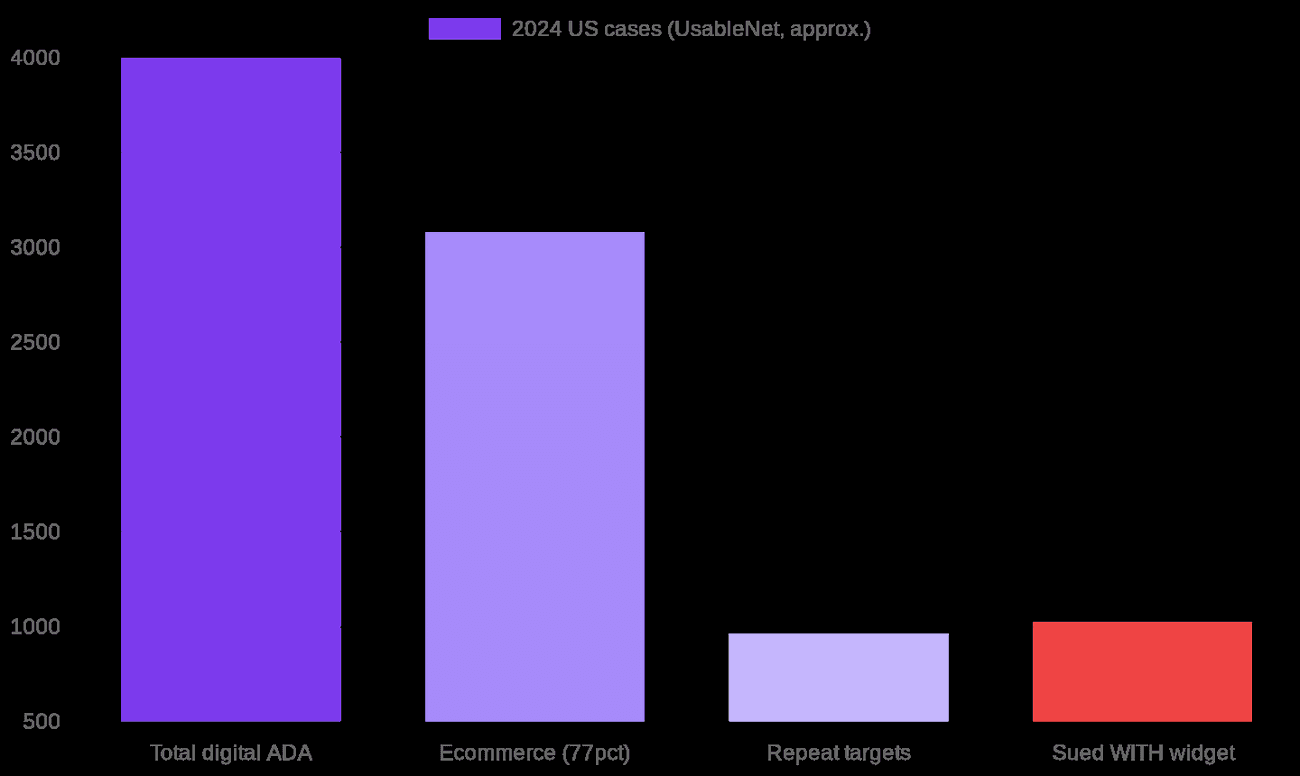
This is where the abstract gets real. UsableNet tracks digital accessibility lawsuits in the US, and their 2024 year-end report is sobering. Over 4,000 digital ADA lawsuits were filed in 2024. Ecommerce sites were the top target, roughly 77% of cases. About one in four lawsuits hit a company that had already been sued before. And most damning for our story: more than 1,000 of the businesses sued in 2024 had an accessibility widget installed when they got hit. (UsableNet 2024 report)
Why the widget doesn't work
Here's the mechanical reason, and it's not complicated. An overlay widget is JavaScript that loads on top of your site and tries to detect and patch accessibility problems on the fly, things like guessing alt text for images or tweaking contrast. But the actual barriers, missing alt text, broken heading order, form fields with no labels, controls you can't reach with a keyboard, bad ARIA, all of that still lives in your source code. The overlay paints over the wall; the cracks are still in the wall. This isn't a fringe opinion. The Overlay Fact Sheet, signed by 800-plus accessibility professionals including people at Microsoft, Google and Amazon, states plainly that no overlay product on the market can make a site fully compliant with any accessibility standard, and therefore none can eliminate legal risk. (overlayfactsheet.com) Many disabled users actively dislike these widgets because they interfere with the screen readers and settings they already have configured. And then the regulator weighed in. In January 2025 the US Federal Trade Commission moved against accessiBe, one of the biggest overlay vendors, and the $1 million order was finalized in April 2025. The FTC's complaint said accessiBe falsely claimed its automated product could make any website WCAG-compliant, and the final order bars it from making that claim without evidence. (FTC press release) When the federal consumer-protection agency fines the vendor for the exact promise the widget sells, that should end the debate.
Three ways to approach it
So what actually works? Here's how I'd compare your real options.
| Approach | What it really does | Cost | Legal risk reduction |
|---|---|---|---|
| Overlay widget | JavaScript patch layered on top; underlying code unchanged | Low, \~monthly subscription | Low, and can become evidence against you |
| Real WCAG remediation | Fix the source: alt text, headings, labels, keyboard nav, contrast, ARIA | Medium to high, dev time | High, fixes the actual barriers |
| Audit-led program | Expert + assistive-tech + automated audit, prioritized fixes, then retest, made ongoing | Highest upfront, ongoing | Highest, and defensible if challenged |
The honest trade-off: the overlay is cheapest and does the least. Real remediation costs developer time but fixes the thing that's actually getting people sued. The audit-led program is the gold standard, because accessibility isn't a one-time task, it's a property your site keeps or loses every time you ship a new template or app. My practical advice for a smaller store that can't fund a full program tomorrow: get a real audit that combines automated tooling with manual testing by someone who actually uses a screen reader, fix the highest-impact issues first (checkout and product pages before your blog), and bake accessibility checks into how you build going forward. That last bit is what turns compliance from a fire drill into a habit.
The takeaway
The widget is appealing for an obvious reason: it's one line of code and a feeling of being done. But "feeling done" and "being compliant" are different things, and in 2024 more than a thousand companies learned that the expensive way. Real accessibility lives in your code and your process, not in a floating icon. The good news is that an accessible store is usually a better store for everyone: cleaner markup, keyboard-friendly checkout, readable contrast, properly labeled forms. You're not just dodging a lawsuit, you're building something more people can actually buy from. So here's my question: if someone navigating your store with only a keyboard and a screen reader tried to check out right now, would they make it to "order confirmed"? Have you ever actually tried it?
Sources
- W3C, Web Content Accessibility Guidelines (WCAG) 2.2: https://www.w3.org/TR/WCAG22/
- European Commission, European Accessibility Act (enforced 28 June 2025): https://ec.europa.eu/social/main.jsp?catId=1202
- Bird & Bird, A guide to navigating the European Accessibility Act for online retailers: https://www.twobirds.com/en/insights/2025/a-guide-to-navigating-the-european-accessibility-act-for-online-retailers-service-providers-and-plat
- UsableNet, 2024 Digital Accessibility Lawsuit Report (4,000+ suits; 77% ecommerce; 1,000+ with widgets): https://blog.usablenet.com/2024-digital-accessibility-lawsuit-report-relased-insights-for-2025
- Overlay Fact Sheet (800+ signatories): https://overlayfactsheet.com/en/
- US Federal Trade Commission, Order Requires accessiBe to Pay $1 Million (Jan 2025; final Apr 2025): https://www.ftc.gov/news-events/news/press-releases/2025/01/ftc-order-requires-online-marketer-pay-1-million-deceptive-claims-its-ai-product-could-make-websites
- Photo: Eddau, CC0, via Wikimedia Commons
- Note: EAA penalty figures and the €2M/10-employee thresholds vary by member state; treat specific euro amounts as estimates.
Remplacez six outils par un seul
Rejoignez la liste d'attente pour etre parmi les premiers, ou reservez une demo.