The Real Cost of a Slow Store: Core Web Vitals, and the Crawlers That Won't Wait
Only 48% of origins pass Core Web Vitals on mobile. Shopify stores pass at 76%, WooCommerce at 33%. Here is what that gap is made of, and how to close it.

Your store is probably slower than you think, and the reason you don't notice is that your browser has cached everything and your office wifi is excellent. Real shoppers arrive cold, on mobile data, on a three-year-old Android.
There's a hard number for this. HTTP Archive and the Chrome UX Report measured origins in July 2025 and found 48% passing Core Web Vitals on mobile and 56% on desktop[1]. Just over half the web fails a bar that Google set deliberately low.
For ecommerce specifically the picture splits hard by platform, and the split is bigger than anything I expected. That data is in the "what we found" section below. First, the part that changed recently and that most performance advice hasn't caught up with: the crawlers reading your product pages to answer shopping questions do not run your JavaScript. Not slowly. At all.
What Core Web Vitals actually are, in 2026
Three metrics. They've changed once and people are still quoting the old one.
Largest Contentful Paint
How long until the biggest thing above the fold has rendered. Good is 2.5 seconds or less, poor is over 4.0, measured at the 75th percentile of real page loads[2]. On a product page the LCP element is almost always the main product image. Sometimes it's the hero text. Occasionally, on a badly built store, it's a cookie banner.
Interaction to Next Paint
INP replaced First Input Delay on 12 March 2024[3]. FID measured only the delay before the first interaction's handler started. INP measures every interaction across the visit and reports the page's overall responsiveness, including processing and presentation[4]. Good is 200ms or less, poor is over 500ms[4].
This is the one that caught people out. A store could pass FID by doing nothing on first click and then lock up for two seconds every time somebody changed a variant. INP catches that.
Cumulative Layout Shift
How much the page jumps around while loading. Good is 0.1 or less, poor is over 0.25[5]. The usual causes are images without dimensions, fonts swapping at a different size to the fallback, and third-party widgets that resize themselves[5]. That last one is why an app you installed for reviews can break a metric you're being measured on.
Google's position on ranking is deliberately hedged, and worth quoting exactly rather than paraphrasing: "Core Web Vitals are used by our ranking systems", but also "there is no single signal" and good scores don't guarantee anything[6]. Anyone who tells you speed is the ranking factor is selling something.
Does this actually impact you?
Two ways, and only one of them is search.
The first is conversion, and I want to be careful here because this is where the field is full of numbers that don't survive checking. Most "one second costs you 7% of conversions" claims trace back to studies commissioned by companies selling performance tooling. The mechanism is real. The specific multiplier you get quoted usually isn't sourced properly.
What is sourced properly: Baymard's abandonment survey found 17% of abandoners cited the website having errors or crashing[7]. That's self-report from shoppers rather than a modelled elasticity, and it's the same 17% as "checkout too long or complicated". Slow and broken read identically to a shopper.
The second is machine readability, which is newer and which most merchants haven't priced in at all. Covered below.
What we found: the platform gap is enormous
Here's the thing that made us go back and re-read the methodology twice. The Web Almanac's 2025 ecommerce analysis breaks Core Web Vitals pass rates down by platform, and the spread is not subtle[8]:
| Platform | Origins passing CWV (desktop) | Share of ecommerce sites (mobile) |
|---|---|---|
| Shopify | 76% | 25.3% |
| Wix eCommerce | 70% | 11.1% |
| Squarespace Commerce | 69% | 9.9% |
| BigCommerce | 55% | 0.9% |
| Magento | 36% | 2.2% |
| WooCommerce | 33% | 44.4% |
Read the two columns together. The most widely used ecommerce platform on the web has the worst performance profile in the dataset, and it isn't close. WooCommerce runs 44.4% of ecommerce sites on mobile and one in three of its stores passes[8].
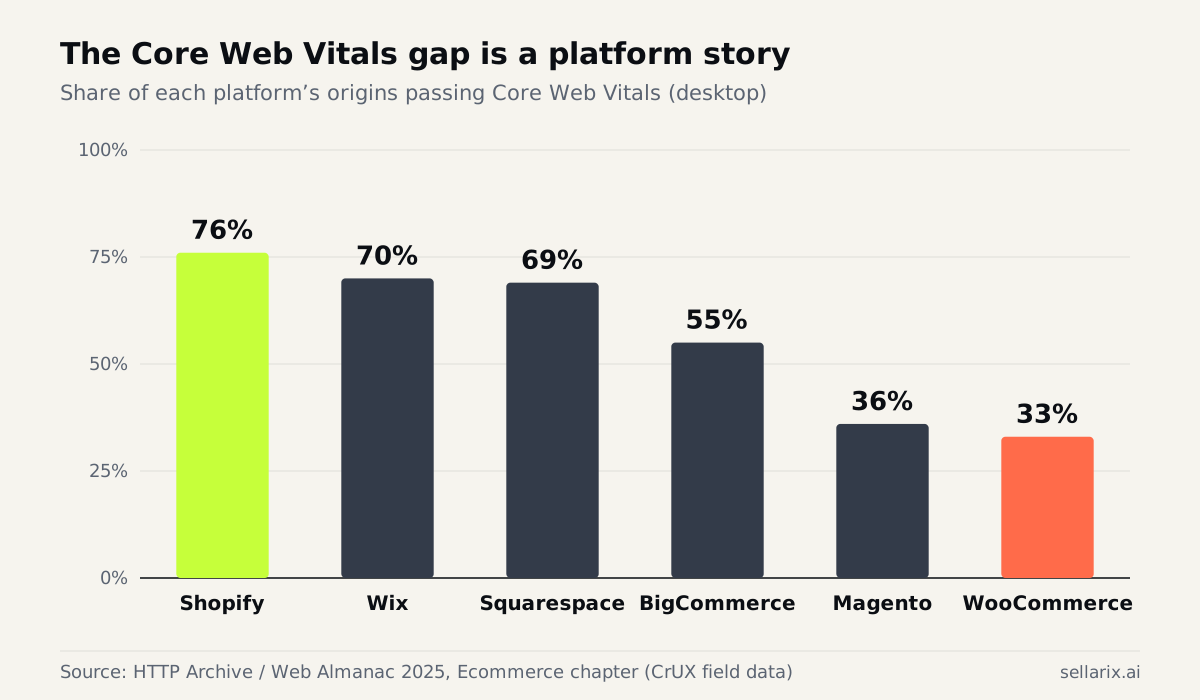
Now the interpretation, because the obvious reading is wrong. This is not evidence that WordPress is slow software. It's evidence about who ends up on which platform and what they do to it. Shopify controls the hosting, the CDN, the image pipeline and the theme architecture. WooCommerce hands all four to the merchant, who is frequently on shared hosting with a page builder, a slider plugin and eleven other things.
The Almanac's own framing is that "SaaS storefronts tend to cluster higher on the Performance category"[8]. That's a statement about the control surface, not about PHP.
The useful conclusion for a Woo merchant: your platform is not condemning you to 33%. It's giving you enough rope that most people hang themselves, and the fixes are largely hosting and plugin discipline rather than code.
The AI crawler problem nobody put in the performance budget
This is the part that's genuinely new since the last time most stores looked at performance.
Vercel instrumented AI crawler traffic across its network and found that none of the major AI crawlers rendered JavaScript. GPTBot fetched JavaScript files 11.50% of the time and never executed them. Claude's crawler fetched them 23.84% of the time, same result[9]. They download your bundle as text and move on.
Diagnose that source: Vercel sells hosting whose main technical pitch is server-side rendering. They have an obvious interest in this finding. The measurement is still the measurement, it's reproducible from your own server logs, and OpenAI's crawler documentation makes no claim of JavaScript execution for any of GPTBot, OAI-SearchBot or ChatGPT-User[10].
The same dataset found something else worth knowing: 34.82% of ChatGPT's fetches hit 404 pages, and Claude's ran at 34.16%[9]. A third of the crawl budget these things spend on you is being burned on dead URLs. If you've replatformed and your redirects are sloppy, that's where it's going.
What this means practically. If your price, stock status, variant list or delivery estimate is injected client-side after page load, an AI shopping assistant sees a page with no price. Googlebot will render it eventually[11]. The rest won't.
So server-side rendering stopped being a performance optimisation and became a visibility requirement. That's a different budget conversation with a different owner.
If you are on Shopify
Why the baseline is good
76% pass rate is the best in the dataset[8], and it's earned. Shopify serves images through its own pipeline, runs a global CDN, and its theme architecture uses server-rendered Liquid by default. Its own theme performance guidance is specific and worth reading rather than skimming[12].
Where Shopify stores still fail
Apps, and one particular kind of theme.
Every app that adds a storefront script adds main-thread work, and main-thread work is INP. A store with a review widget, a size guide, an upsell popup, a wishlist, a currency switcher and a chat launcher is running six third-party bundles before the shopper touches anything. That's how a 76%-baseline platform produces a store at 400ms INP.
The other failure is heavily customised page-builder themes that render sections client-side. You gave up Shopify's main structural advantage and you're paying for it twice, once in LCP and once in crawler visibility.
Shopify's platform-level performance notes cover what it handles versus what remains yours[13]. The short version: hosting and delivery are theirs, everything you install is yours.
Not on Shopify? The other platforms
WooCommerce
33% passing[8], and in my experience the causes are almost always the same four things in the same order.
Hosting. Shared hosting with no object cache is the single biggest determinant. Time to first byte on a cold cart page is where Woo LCP dies.
Plugin count. Each one enqueues CSS and JS on every page, including pages that don't use it. Most stores can cut 30% of front-end bytes by dequeuing assets on templates that don't need them.
Order storage. If you haven't migrated to High-Performance Order Storage, order reads and writes are still going through the WordPress posts table, which is a schema designed for blog articles[14]. On a busy store this shows up as checkout timeouts, which is the 17% "site had errors" bucket[7].
Images. No automatic WebP or AVIF conversion, no responsive srcset unless the theme does it. A 2MB hero JPEG uploaded from a phone is still a live risk in a way it simply isn't on Shopify.
Magento and Adobe Commerce
36% passing[8]. Different problem to Woo. Magento is heavy by design, and Adobe publishes a detailed performance best-practices guide covering Varnish, Redis, indexers and flat catalogue trade-offs[15].
The specific Magento killer is the JavaScript bundle. RequireJS plus Knockout plus a decade of modules produces a front end that fails INP even when the server is fast. Full-page cache fixes your TTFB and does nothing for your main thread.
If you're on 2.4.6, note that support ends 11 August 2026[16]. Upgrade planning and performance work want to happen in the same project, not sequentially.
BigCommerce
55% passing[8]. Middle of the pack. Stencil gives you server-rendered Handlebars templates and BigCommerce handles hosting and CDN[17], so the structure is sound. The gap versus Shopify is mostly theme quality and app scripts again.
Headless and custom builds
Headless can be the fastest thing on this list or the slowest, and there's no middle. A properly built Next.js storefront with static product pages and edge caching will beat every platform here. A single-page app that fetches the product from an API on mount will fail LCP, fail INP, and be invisible to every AI crawler simultaneously[9].
The deciding factor is whether the product page HTML contains the price when it leaves the server. Curl your own PDP and grep for the price. If it isn't there, you have a problem that no amount of image optimisation will fix. More on the trade-offs in the headless piece.
The performance fix list, in order of return
Ranked by what actually moves the metrics on a store, not by what's fashionable.
| # | Fix | Metric | Effort |
|---|---|---|---|
| 1 | Set width and height on every image | CLS | Trivial |
| 2 | Stop lazy-loading the LCP image | LCP | Trivial[18] |
| 3 | Preload the LCP image, preconnect to the image host | LCP | Small[19] |
| 4 | Serve WebP or AVIF with responsive srcset | LCP | Small |
| 5 | Reserve space for anything injected by an app | CLS | Small |
| 6 | Self-host fonts, use font-display: swap, size-adjust the fallback | CLS, LCP | Small |
| 7 | Defer or remove third-party scripts on the PDP | INP | Medium |
| 8 | Break up long tasks, yield to the main thread | INP | Medium |
| 9 | Server-render price, stock and variants | LCP, AI visibility | Medium to large |
| 10 | Speculation rules for likely next navigations | Perceived speed | Medium[20] |
| 11 | Object cache and a real CDN | All, on self-hosted | Hosting change |
| 12 | Fix your 404s so crawlers stop wasting a third of their visit | Crawl efficiency | Small[9] |
Numbers 1 and 2 together fix more stores than everything below them combined, and both are one-line changes. That's not a satisfying thing to write but it's true.
Measure it properly, or don't bother
Lighthouse in your browser is a lab test on your machine, your network and your CPU. It's a debugging tool. It is not your score[23].
Your score comes from field data: real Chrome users, 75th percentile, 28-day rolling window. That's the Chrome UX Report, and it's what Search Console's Core Web Vitals report shows you[21]. CrUX only reports origins and URLs with enough traffic to be statistically meaningful, so small stores get no field data at all[22].
If you're under the CrUX threshold, collect your own. The web-vitals library gives you real user measurements from your actual traffic, which beats guessing. And it's the only way to know whether the fix you shipped on Tuesday did anything.
One trap worth naming. Chrome's field data is desktop and Android only. If a large share of your traffic is iOS Safari, CrUX is not describing your customers. Check your analytics split before you draw conclusions. There's more on measurement gaps in the analytics stack piece.
What to do this week
- Open Search Console's Core Web Vitals report. Mobile first. Note which of the three you're failing and on which URL group[21].
- Curl your own product page and search the raw HTML for the price. If it isn't there, that's your biggest finding of the week.
- Check the LCP image isn't lazy-loaded. This is the most common single mistake on product pages and it takes one attribute to fix[18].
- Count third-party scripts on your PDP. Network tab, filter to JS, sort by domain. Anything you can't justify, remove.
- Pull your server logs for GPTBot and ClaudeBot and check what proportion is hitting 404s. A third would be normal, which is a depressing sentence[9].
- Test on a throttled connection with a cleared cache, on an actual phone. Not the emulator.
- If you're on WooCommerce, check HPOS is enabled and your host runs a persistent object cache[14].
The takeaway
Half the web fails Core Web Vitals and the failure clusters by platform in a way that's really a story about how much control the merchant has and what they did with it[8]. Shopify at 76%, WooCommerce at 33%, and the same fixes available to both.
The genuinely new thing is that speed and machine readability collapsed into one problem. A page that renders its price client-side is slow for humans and blank for every AI crawler except Google's[9]. Two years ago that was a performance nice-to-have. Now it's whether you exist in a shopping answer.
I spent a long time treating performance as an engineering vanity project, something you did after the real work. That was wrong, and specifically it was wrong because I was measuring in Lighthouse on a laptop plugged into fibre and getting 94.
What does your PDP score on a real phone, on 4G, with a cold cache?
Sources
- HTTP Archive, "Web Almanac 2025: Performance" (CrUX + HTTP Archive, July 2025 dataset).
- Google / web.dev, "Largest Contentful Paint (LCP)". Accessed 22 July 2026.
- Google / web.dev, "Interaction to Next Paint becomes a Core Web Vital on March 12", 2024.
- Google / web.dev, "Interaction to Next Paint (INP)". Accessed 22 July 2026.
- Google / web.dev, "Cumulative Layout Shift (CLS)". Accessed 22 July 2026.
- Google, "Understanding page experience in Google Search results". Accessed 22 July 2026.
- Baymard Institute, "Cart Abandonment Rate Statistics". Accessed 22 July 2026.
- HTTP Archive, "Web Almanac 2025: Ecommerce".
- Vercel, "The rise of the AI crawler", December 2024. (Vercel sells server-side rendering infrastructure; the crawl measurements are reproducible from your own logs.)
- OpenAI, "OpenAI crawlers and user agents". Accessed 22 July 2026.
- Google, "Understand the JavaScript SEO basics". Accessed 22 July 2026.
- Shopify, "Theme performance best practices". Accessed 22 July 2026.
- Shopify, "Platform performance". Accessed 22 July 2026.
- WooCommerce, "High-Performance Order Storage". Accessed 22 July 2026.
- Adobe, "Adobe Commerce performance best practices". Accessed 22 July 2026.
- Adobe, "Released versions". Accessed 22 July 2026.
- BigCommerce, "Stencil Themes". Accessed 22 July 2026.
- Google / web.dev, "The performance effects of too much lazy loading". Accessed 22 July 2026.
- Google / web.dev, "Optimize Largest Contentful Paint". Accessed 22 July 2026.
- MDN Web Docs, "Speculative loading". Accessed 22 July 2026.
- Google, "Core Web Vitals report", Search Console Help. Accessed 22 July 2026.
- Google, "CrUX methodology". Accessed 22 July 2026.
- Google / web.dev, "Web Vitals". Accessed 22 July 2026.